Blog · October 2026 · 7 min read
How to generate a PDF invoice online in seconds
You do not need Word, a designer or an hour of your afternoon. A PDF invoice is four steps away: your details, your client, your line items, and a download button. Here is the process, what separates a usable PDF from a broken one, and the five ways online generators quietly ruin an invoice.
Why clients ask for a PDF
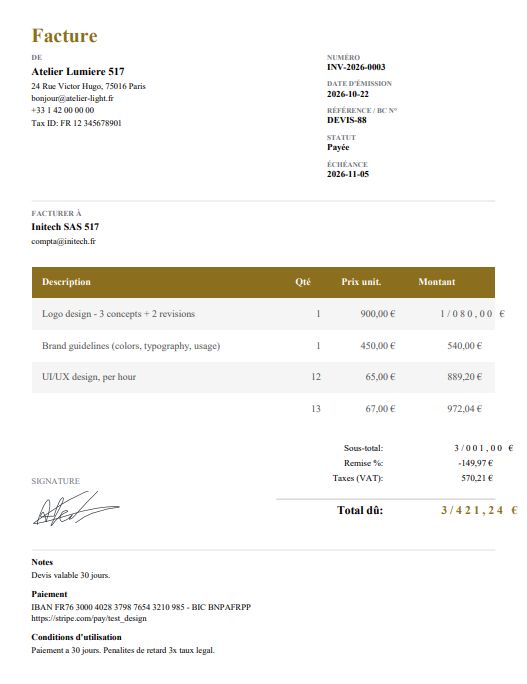
A PDF holds its layout on every device and in every email client. The columns stay where you put them, the total stays where it belongs, and the file prints on A4 exactly as it appeared on your screen. There is no dependency on the recipient owning particular software, and no risk that a font substitution shifts your numbers half a line to the left.
It also archives. An invoice you sent three years ago still opens the same way today, which is what a tax record has to do. A spreadsheet reflows when the other person opens it. A shared link breaks when you change the tool. A PDF just sits there and stays correct.
Generate a PDF invoice online in 4 steps
- Set up your business once. Name, address, email, phone, tax ID, and payment instructions. Enter it in settings and it appears on every document you make from then on. This is the step that saves you ten minutes per invoice.
- Pick the document and the template. If you are billing for work already done, it is an invoice. If you are quoting first, make it a quotation. Then choose one of 12 templates. The template changes the look and nothing else; your numbers are untouched.
- Add the line items. One row per good or service: description, quantity, unit price, optional discount and tax rate. Subtotals, discounts and tax calculate as you type, and a document level discount comes off before tax is applied so the total stays honest.
- Preview, then download. Read the total once in the preview, then take the PDF. Word, PNG and CSV are there too if the client asks for something else.
The output is a standard A4 page with selectable text, correct in all 9 languages including right to left Arabic, and priced in 6 currencies. No account, no watermark, and nothing you type leaves your own browser.
What makes a PDF invoice actually usable
Any tool can produce a file with a .pdf extension. These are the qualities that decide whether the finance team on the other end accepts it without a reply email:
- Selectable text. The recipient should be able to highlight your total and paste it into their payment run. A PDF that is really a screenshot cannot be searched, selected or copied, and it looks blurred when printed.
- Standard page size. A4 is what most of the world files. Printing an oddly sized page onto office paper clips the edges and drops your bank details off the bottom.
- Clean page breaks. Long descriptions and many line items should flow onto a second page without slicing a row in half or covering the total.
- No watermark. a faint logo across the amount due reads as amateur, and some finance teams reject it outright.
- Correct right to left layout. An Arabic invoice with left aligned fields is immediately wrong to the reader, no matter how good the numbers are.
- The right currency and locale. A German client expects EUR with a comma decimal, an American one expects USD with a period. The money formatting should follow the currency you picked.
- A sensible file name.
INV-2026-0002.pdfbeatsinvoice_final_v3(1).pdfevery time.
Five ways online PDF generators go wrong
- They rasterise the page. The result is an image wearing a PDF extension. Unsearchable, unselectable, heavier than it should be. This is the single most common quality problem.
- They require an account first. Your client list and rates get stored on someone else's server before you have even made a document. That is a decision you should make deliberately, not one you walk into because a sign-up form was in the way.
- They watermark the output. Free tier, logo across the total, upgrade to remove it. Your invoice becomes an advertisement at the exact moment it should look most professional.
- They break on multi-page documents. A ten line job that clips halfway down page one, with the grand total nowhere to be found, is worse than no invoice.
- They mishandle non-US formats. The wrong decimal separator, an untranslated date, or Arabic text running left to right. Small errors that make the document look machine generated.
Sending it properly
Name the file with the invoice number, attach it rather than pasting a link, and put the number and the amount in the subject line so it is findable in a search six months from now. State the due date in the body as well as on the document, and say how you want to be paid.
Then keep your own copy in a folder named for the series. Because everything here runs locally, your records stay on your device until you back them up, so make the backup a habit rather than a chore you remember in April.
PDF invoice FAQ
How do I generate a PDF invoice online?
Open a generator in your browser, enter your business details and your client, add line items with quantities and prices, choose a template, then click Download PDF. The whole thing takes a couple of minutes and needs no software install.
Why should an invoice be a PDF?
A PDF keeps the layout exactly as you designed it on every device and email client, prints on standard paper, and can be archived for years without opening in the wrong program. A spreadsheet or a shared link does neither.
Can my client edit a PDF invoice?
That is the point of the format. The PDF is the fixed record of what was billed. If something must change after it is sent, issue a corrected document or a credit note rather than quietly editing the original.
Why is the text in my PDF invoice not selectable?
Because the file is a picture of a page rather than real text. Some generators rasterise the output, which stops the client searching, selecting or copying the total. A proper generator writes selectable text and handles long descriptions and multiple pages.
What should I name my PDF invoice file?
Use the invoice number: INV-2026-0002.pdf. It matches your numbering series, sorts correctly in a folder, and makes the document easy to find a year later when someone asks for a copy.
Is generating a PDF invoice online free?
It is here. There is no account, no trial and no watermark on the document. You also get Word, PNG and CSV exports if a client wants another format.
No sign-up, no watermark, nothing leaves your browser.