Blog · October 2026 · 7 min read
What is an invoice generator, and how does it work?
An invoice generator turns the details you already know into a finished invoice. You type your business, your client and your line items; it does the arithmetic, lays out the document, assigns the next number and hands you a file. Here is what is really happening behind that, and what to check before you trust one with your money.
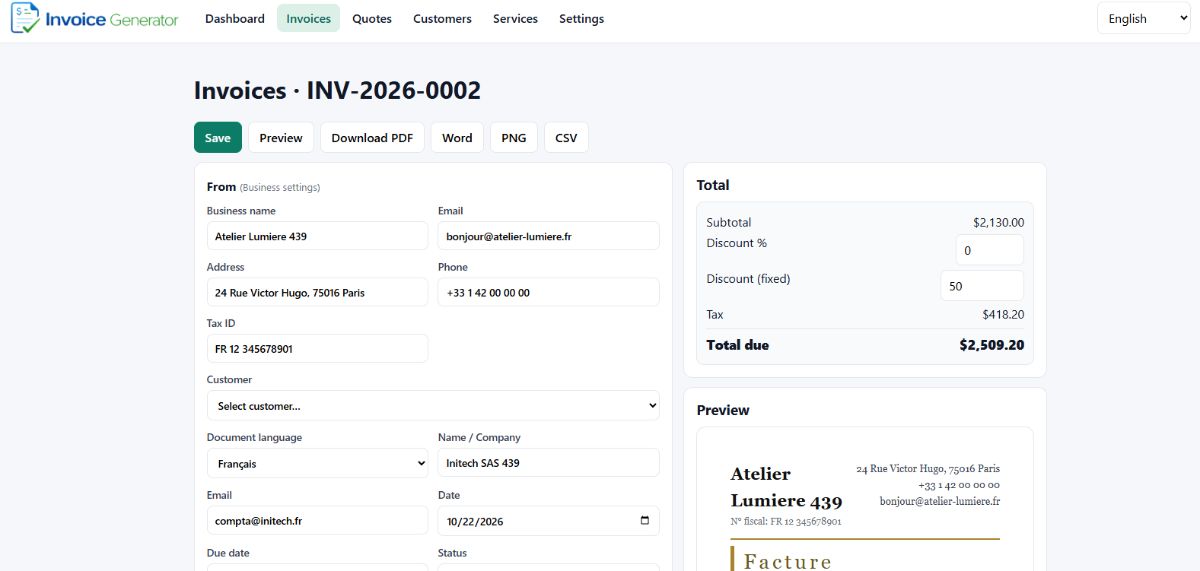
The editor: fill in the left column, watch the totals on the right, download as PDF, Word, PNG or CSV.
What an invoice generator is
An invoice generator is software that assembles an invoice document out of raw input. Give it the two parties, the lines of work, the prices and the tax rate, and it produces a document that is ready to send. It is not a spreadsheet and it is not an accounting suite. It has one job: turn what you owe into what you can bill.
That separates it from the two things people usually try instead. A blank template gives you the layout but leaves the arithmetic to you, which is where rounding errors and stale totals creep in. Full accounting software does calculate correctly, but you pay for it in setup, subscriptions and features you will never open if all you need is a document this afternoon.
The five jobs it does for you
- It remembers your details. Your name, address, tax ID and payment instructions are entered once and reused on every document, so you never retype your own address for the fourth time.
- It calculates. Line totals, per-line discounts, document-level percentage and fixed discounts, and tax. Order matters here: the discount comes off before tax is worked out, and when a document discount exists the tax is prorated so the total stays honest.
- It lays the document out. Twelve templates, from a restrained Classic to a gold-trimmed Luxury, all rendering the same numbers with selectable text so a client on the other end can copy the total into their payment run.
- It numbers the document. Invoices take the next number in the INV series, quotations take from the QUO series, receipts from REC. Numbers stay unique and sequential, which is what makes your records traceable a year later.
- It exports. PDF for sending, Word when a client wants to edit, PNG for chat apps, CSV for your spreadsheet. Some tools stop at the PDF; the other formats are what you reach for later.
What it actually replaces
- The Excel file with the broken formula. The one where someone dragged a cell and the total has been wrong for three months.
- Retyping client details. Once a client is saved, the next invoice to them is a dropdown away.
- Designing a document from scratch. Nobody should be nudging text boxes in a word processor to bill for a logo.
- A full accounting subscription if what you genuinely need is the document and not the ledger.
Seven things to check before you use one
Not every tool with an invoice on the homepage is worth your client's attention. These are the checks that matter:
- Does it demand an account? If your client list and rates must live on someone else's server before you can make a document, that is a trade you should make deliberately, not by default. A local-first generator keeps everything in your own browser.
- Is there a watermark? A faint logo across your total looks amateur to the finance team that has to approve it.
- Does it calculate in the right order? Discount first, then tax, then total. Ask it for a fixed discount and a tax rate and see whether the total comes out right.
- Does it number properly? Unique, sequential, and separate series for invoices, quotes and receipts. Reused numbers are an audit problem waiting to happen.
- Which languages and currencies? If you invoice across borders you need the document in your client's language, in their currency, and right-to-left if that language reads that way. Nine languages and six currencies cover most small operators.
- Which formats come out? PDF is table stakes. Word, PNG and CSV are the ones you will want the week a client asks for something different.
- How many document types? Today it is an invoice. Next month the client wants a quote, then a credit note when the scope shrinks. Twelve document types means you do not switch tools halfway through a relationship.
Invoice generator vs accounting software
They solve different problems, and the honest answer is that many businesses end up with both.
An invoice generator produces the document: it gets a correct, professional invoice in front of your client today. Accounting software keeps the book: it tracks who has paid, matches payments to invoices, reconciles against the bank and assembles what your accountant needs in April.
If you are freelancing, contracting or running a small service business, start with the generator. Move to accounting software when you find yourself manually checking which invoices are unpaid, or when reconciling has become a monthly chore you resent. Until then you are paying, and learning, for a ledger you do not read.
How to make an invoice in four steps
- Set up your business once. Name, address, email, phone, tax ID, payment instructions. This lives in settings and appears on every document after that.
- Pick the document type and template. Invoice, quotation, receipt or one of the others, then choose a design. Switching later does not touch your data.
- Add your line items. Description, quantity, unit price, optional discount and tax rate per line. Totals update as you type.
- Preview and download. Check the total, then take it as PDF, Word, PNG or CSV.
A worked example. A designer bills two lines: logo design, quantity 1 at $800, and a brand style guide, quantity 1 at $1,200. The subtotal is $2,000. A fixed discount of $50 brings the taxable base to $1,950. VAT at 20% adds $390. The total due is $2,340. Every one of those figures is visible in the totals panel before you download, so there is no surprise when the client queries it.
Invoice generator FAQ
What is an invoice generator?
A tool that builds a finished invoice from the details you type in. You enter your business, your client and your line items; it calculates the totals, lays out the document, assigns a number and gives you a file to send.
Is an invoice generator the same as accounting software?
No. An invoice generator produces the document. Accounting software keeps the books: it tracks what you are owed, reconciles bank activity, chases late payers and prepares tax filings. Many small businesses use both.
Do I need an account to use an invoice generator?
Not with this one. It runs in your browser and keeps your data on your own device, so there is no sign-up, no login and nothing uploaded to a server.
Are invoices from an invoice generator valid?
Yes, provided the document carries what your jurisdiction requires: your business details, the client details, a unique invoice number, issue and due dates, itemised lines, totals and payment terms. An invoice generator produces that document; what makes it compliant is the information you enter and the records you keep.
What file formats can I download?
PDF for sending and printing, Word for editing, PNG for chat apps and email signatures, and CSV for importing into a spreadsheet or bookkeeping tool.
Can an invoice generator make quotes and receipts too?
Yes. The same tool handles quotations, estimates, proforma invoices, sales receipts, cash receipts, credit notes, purchase orders and delivery notes, each with its own numbering series.
Try the invoice generator free
No sign-up, no watermark, nothing leaves your browser.