Blog · October 2026 · 9 min read
How to choose the best free online invoice generator
The words "free online invoice generator" describe hundreds of tools that promise the same thing in the same order: no sign up, no watermark, instant PDF. Two clicks later you are choosing a plan, or the file you downloaded has somebody else's logo across the header, or the invoice you spent ten minutes on is locked behind an account you did not want. The difference between a genuinely free tool and a trial with good marketing is not visible on the landing page. It shows up at the moment you press download. This is what to check, what to avoid, and how to settle the question in ten minutes using nothing but your own eyes.
What "free" has to mean
Free has four parts, and a tool only earns the word when it has all four:
- Free to use. No card to start, no trial clock, no document cap that turns into a paywall on invoice number eleven.
- Free to download. The PDF arrives as a real file, not as a preview you can see but not send.
- Clean output. No watermark, no advertising strip, no "created with" badge in your client's inbox.
- Free to keep. Your customers, rates and documents stay readable and exportable without paying an exit fee.
Notice what is not on that list: unlimited storage on someone else's servers, team collaboration, an accounting suite. Those cost money to run, and when they are offered free the cost usually appears somewhere else, most often as your data sitting in an account you did not mean to create. The free invoice maker vs. invoicing software guide covers where that line falls for a real business.
The eight checks that decide it
Run these before you type anything personal into a new tool. Each one takes under a minute and none of them require an account.
| Check | Passes when | Fails when |
|---|---|---|
| Sign up | You can create a document immediately | A registration wall appears before the editor |
| The PDF | Text can be selected and copied out of it | The text is a picture, or a watermark runs across it |
| Tax and discount | Both apply per line, and the document discount comes off before tax | Only a total level tax exists, or the discount is applied after tax |
| Numbering | Invoices, quotes and receipts each increment on their own sequence | You are expected to invent numbers and remember them |
| Multi page | A long invoice breaks onto a second page cleanly | Rows are cut off or shrink to an unreadable size |
| Your data | Documents live in your browser and export as a backup file | Everything needs an account before it will save |
| Export formats | PDF, and at least one editable or spreadsheet format | PDF only, with the rest behind a subscription |
| The exit | You can export everything as JSON and walk away | Your history is stuck inside the product |
The tax row is the one people skip, and it is the one that costs money. If a tool discounts after tax, every concession you grant is calculated on the wrong base and your printed total will disagree with what your client's finance team computes. What is an invoice generator walks through the correct order with a worked example.
The ten minute test
Skip the comparison tables on marketing pages. Do this instead:
- Minute one. Open the tool and see whether you can add a line without registering. If not, close it and try the next one.
- Minutes two to four. Build a small invoice: your details, a client, two line items, a quantity above one.
- Minute five. Add a per line discount and a tax rate, then check the printed subtotal, tax line and total add up on paper. Do the arithmetic yourself.
- Minute six. Add enough lines to force a second page. Look at how the header repeats and whether any row is clipped.
- Minute seven. Download the PDF and try to select a line of text with your mouse. Copy it into a message. If the text will not select, the document is an image, and neither a search nor a purchase order system will ever find it.
- Minute eight. Read the file for anyone else's name. Watermarks, footers and promotional strips are disqualifying.
- Minute nine. Make a quotation, convert it to an invoice, and confirm the customer, lines and totals carried over with a fresh number.
- Minute ten. Find the export button for your own data. If your work cannot leave, you are not a customer, you are inventory.
Most tools fail at minute two, minute seven or minute ten. That is a short list of what to test, and it is the only evaluation that cannot be faked.
What freelancers need and what small businesses need
The two audiences overlap heavily but not completely, and the difference shows up in which documents get created.
Freelancers mostly need an invoice and a quotation, plus a receipt when the money lands. Speed matters more than breadth: the document has to be finished between two pieces of actual work. Saved customers and a library of repeat services are what make that possible, because retyping your own rate list every Friday is the reason freelancers stop invoicing on time. Deposits and retainers are common, so a quotation that converts to an invoice in one click is worth more than a dozen templates.
Small businesses need the same core plus the paperwork around it: estimates before work, credit notes when something is reversed, purchase orders when they buy on a client's behalf, and delivery notes when goods move. Multiple document types with consistent numbering are what keep a small company auditable, because the sequence itself is the record. Quotation vs estimate vs proforma explains which pre-work document to send when.
Both groups need the same three things from the tool itself: it must be quick, it must be clean on paper, and it must not require a login every time. Everything else is preference.
Red flags worth walking away from
- A watermark on the free PDF. It tells you the invoice is an advertisement before your client has read line one.
- Requiring an account to see your own document. You have done the work; withholding it is leverage, not security.
- A monthly cap on free documents that is quietly counted from your first draft.
- Text in the PDF that cannot be selected, which breaks searching, accessibility and any automated purchase order matching.
- No due date field, or a due date that is a free text box rather than a date.
- Tax applied after the document discount, which produces totals your client will reject.
- Automatic rounding that changes a cent without showing it anywhere.
- No way to export your data, or an export format that only reimports into the same product.
- Claims of tax compliance guarantees. No generator can promise that; tax rules depend on your country, your status and your client. The honest version is configurable tax names and rates, plus a footer that says so.
What a genuinely free invoice generator should ship with
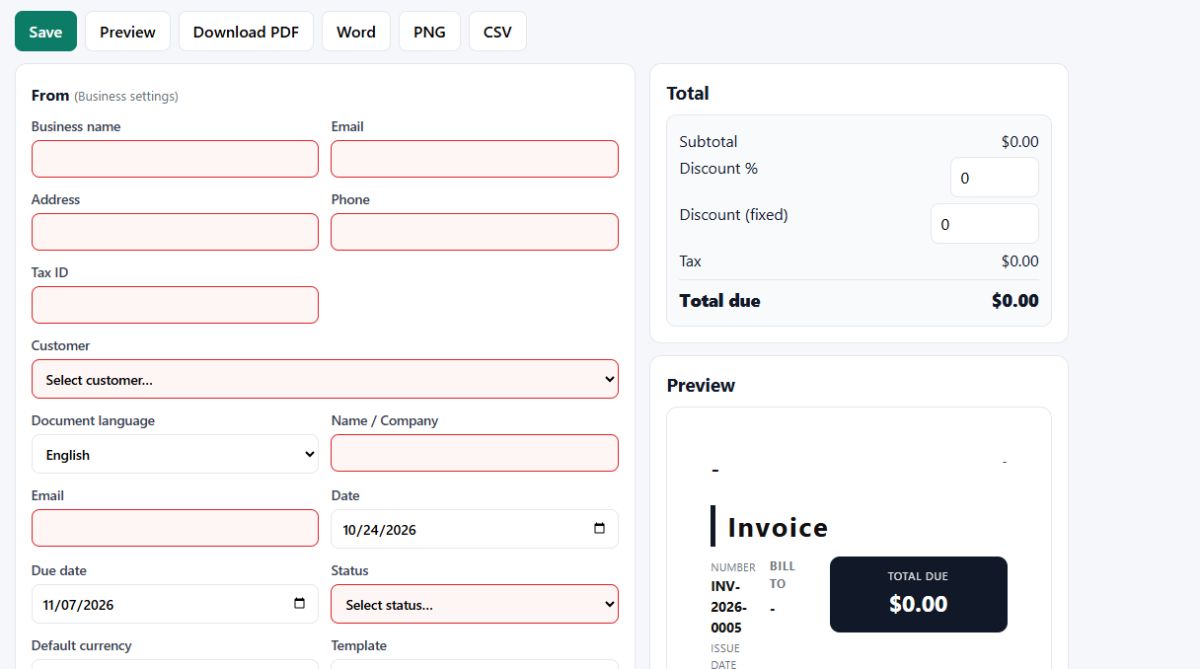
This is the bar we hold Invoice Generator to, and every claim below is something you can open the app and check for yourself rather than take on trust from this page:
- 12 templates that all render the same document data, so changing the look never changes the numbers.
- 9 languages including right to left Arabic, with the document language selectable separately from the interface language.
- 6 currencies (EUR, USD, GBP, MAD, CAD, AUD) formatted for the locale they belong to.
- 12 document types from invoice, bill, tax invoice, proforma, receipt, sales receipt and cash receipt through to quotation, estimate, credit note, purchase order and delivery note.
- A4 PDF with selectable text that breaks across multiple pages, plus Word, PNG and CSV exports for the file your accountant asks for.
- Line level quantity, rate, discount and tax, with a document level discount applied before tax so the printed subtotal stays honest.
- Separate numbering series for invoices, quotations and receipts, so nothing is ever issued twice.
- Status tracking across draft, sent, partially paid, paid, overdue and cancelled, plus a payment link field for Stripe, PayPal or Mollie.
- JSON backup you export yourself and import back whenever you like, including on another machine.
There is no watermark, no account and no upload. The 12 free invoice templates are the same ones you preview on the homepage before typing a word.
Why local first changes the risk
Every invoice you send contains information you would rather not have published: what you charge, who your customers are, where money goes. A tool that processes documents in your browser has none of it. There is no account to breach, no cloud folder to misconfigure, and no staff member with support access who can open your client list. The trade off is real and should be stated plainly: your data lives in your browser profile, so clearing site data without exporting first deletes it. That is why the JSON export is not a bonus feature, it is the routine that makes local storage safe to rely on. Export monthly, keep the file somewhere you control, and you have the backup discipline of a hosted product without the exposure. The privacy policy spells out exactly what is collected and what is not.
Free generator, template file, or subscription
A downloaded template in Word or Excel is free forever and works offline, and it is the right choice when you issue two documents a year. It also has no numbering, no tax maths, no conversion from quotation to invoice, and no way to stop two people editing the same file with different totals in it.
A subscription earns its fee when invoicing is a weekly activity with employees involved, multiple currencies in play, and a need for reconciliation against bank feeds. Below that threshold you are paying for bookkeeping infrastructure you do not operate yet.
The free online invoice generator sits between the two: the maths, the numbering, the templates and the exports of real software, with none of the recurring cost and none of the data custody. If you outgrow it, you take your JSON file with you. The nine elements every invoice needs is the checklist version of building a document that a client's finance team will approve on first read.
Before you hit send
Whatever tool you choose, these five habits are what actually get an invoice paid:
- Write the due date as a date, not as "net 30" in a notes box nobody reads.
- Carry the client's purchase order number in the reference field, or the document may never reach the payment run.
- Put a payment link on it so the only remaining step is paying.
- Keep the status current. A weekly look at what is marked overdue is where unpaid work hides.
- Issue a receipt when the money lands, so the next invoice does not chase a balance already settled.
Send it the day the work is delivered. Fresh invoices are approved with that week's paperwork; old ones get questioned.
Free online invoice generator FAQ
What is a free online invoice generator?
A tool that turns the details you type into a finished, numbered invoice you can download and send, at no cost and without installing accounting software. A good one builds the file in your browser, so the document exists on your device rather than on someone else's server.
Is a free online invoice generator really free?
Some are and some are not. The honest ones make money from paid tiers or optional extras, and keep the core free forever. The dishonest ones print a watermark on the PDF, hide the download behind a sign up, or cap how many documents you can export before charging you.
What should a free online invoice generator include?
A real PDF export with selectable text, line items with quantity, rate, discount and tax, a document number that increments on its own, due dates, your business and client details, payment terms and notes. Anything less means you rebuild the missing part by hand every month.
Can I make an invoice without creating an account?
Yes, if the tool stores your data locally. No registration means no password to lose, no trial to expire and no card details sitting in a database. You should still export a backup file regularly, because local storage only lives as long as your browser profile does.
Is my data safe with an online invoice generator?
It is safest when nothing is uploaded. A tool that runs entirely in your browser never transmits your customer names, rates or bank details, so there is no account to breach and no cloud folder to leak. Check the privacy policy for what it says about analytics and about whether your documents ever leave the device.
Which free online invoice generator should a freelancer choose?
The one that passes your own ten minute test: create a document, add tax and a discount, download the PDF and read it back. Prefer the tool that shows you the file immediately, keeps your data on your device, and does not put its name across your invoice.
No sign-up, no watermark, nothing leaves your browser.